Functional Description
Project Hierarchy
Breaking down the hierarchy of this project there will be two physical subsystems each comprised of their own hardware. Following Figure 4: OV-4 Diagram, the first subsystem will be denoted as subsystem A which will be comprised of the Raspberry Pi Display, Raspberry Pi 4, and Raspberry Pi Camera. The second subsystem will be denoted as subsystem B which will be comprised of the hard drive and Raspberry Pi Zero.
The next layer down shows the software level for each subsystem. Subsystem A will use four custom libraries written for this project, libcamera will deal with any camera interactions, libdisplay will deal with any display interactions, libstock will provide stock tickers, and libtrading will enable stock trading. This modularized architecture was chosen to allow for separation of responsibilities and a cleaning overall software architecture. Staying on this software level of the diagram subsystem B will be using Open Media Vault. Which is an open source program allowing for network mounted storage.
Following the diagram to its final, bottom layer are libraries leveraged to create the four necessary libraries for this project’s use case. Each library is given a quote summarizing what it does as well as a link to each library in the later section Python Libraries Leveraged but the relation of every library can clearly be seen in the diagram.
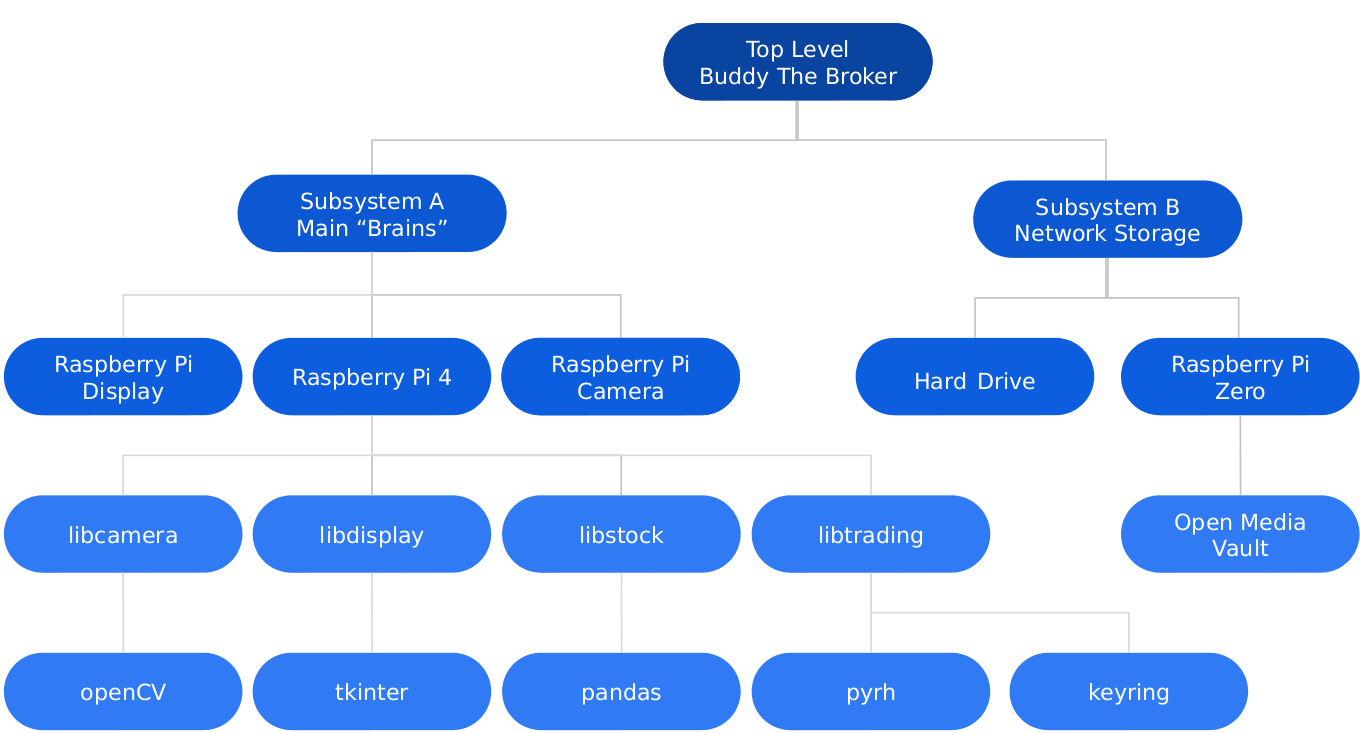
Figure 4: OV-4 Diagram
Subsystem A: Main “Brains”
To get a more realistic depiction of what subsystem A will look like Figure 5: Subsystem A is provided. It can be seen that the camera, display, and Raspberry Pi will all fit together neatly in one case. This assembly will be mounted atop Buddy’s food dispenser. This case an pivot allowing for the optimum camera angle to get the best view of Buddy. The Python logo on both the cartoon Pi and the “real” Pi depicts that this subsystem will be using Python for its various libraries.
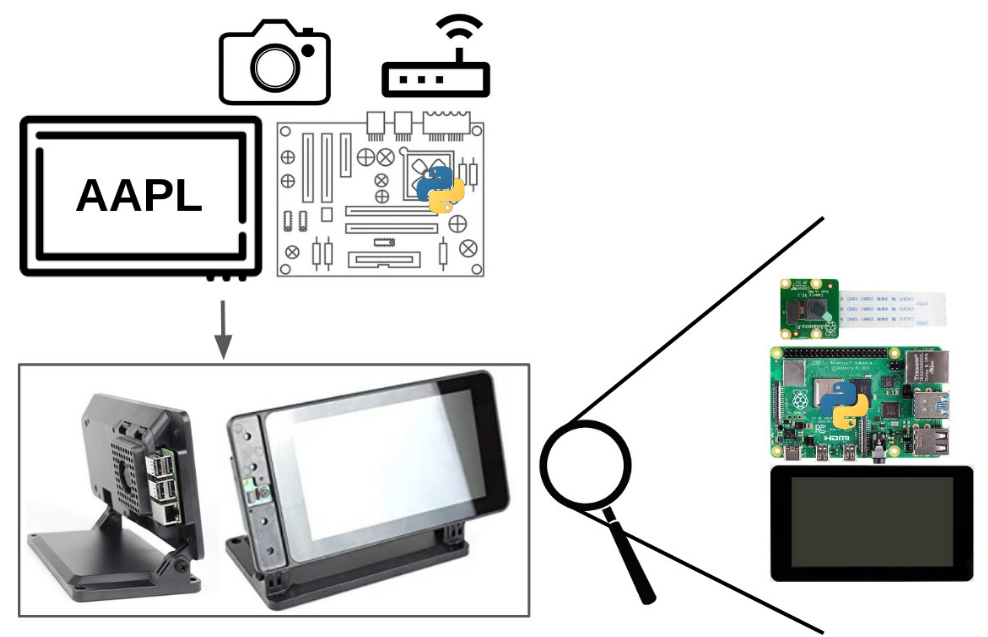
Figure 5: Subsystem A
Libcamera
This library will use computer vision to locate any cats (Buddy) in frame and return the coordinates. This library also will save off the recorded video to a remote hard drive, see sections Subsystem B: Network Storage and Remote Storage (Open Media Vault Use Case).
Libstock
This library will return stock information given an index. This library will use the top 1000 stocks ordered by market capitalization.
Libtrading
This library provides a means to interact with some brokerage account in order to allow for automated buying and selling of stocks. There are several trading accounts that support this but I’ve chosen Robinhood as I already have an open account, the API is free to use, and the app would allow me to easily monitor Buddy’s stock picks while at work.
Moreover, the system will need the smarts to keep track of the order I’m which the stocks had been picked in which order to know which to sell first, how much money is left in the account, the number of trades made each day for each stock to prevent the account as being flagged as a pattern day trader, and buffering of any stock picks (if made while the market is closed) until market open.
Libdisplay
Display the ticker of the current stock that Buddy could buy. This will display a new stock ticker on a regularly interval.
Subsystem B: Network Storage
To get a more realistic depiction of what subsystem B will look like Figure 6: Subsytem B is provided. It can be seen that Raspberry Pi will be connected to a hard drive docking station via a USB cable. This hard drive docking station will house a 4TB hard drive. The Open Media Vault logo on both the cartoon Pi and the “real” Pi depicts that this subsystem will be running Open Media Vault for its operations.
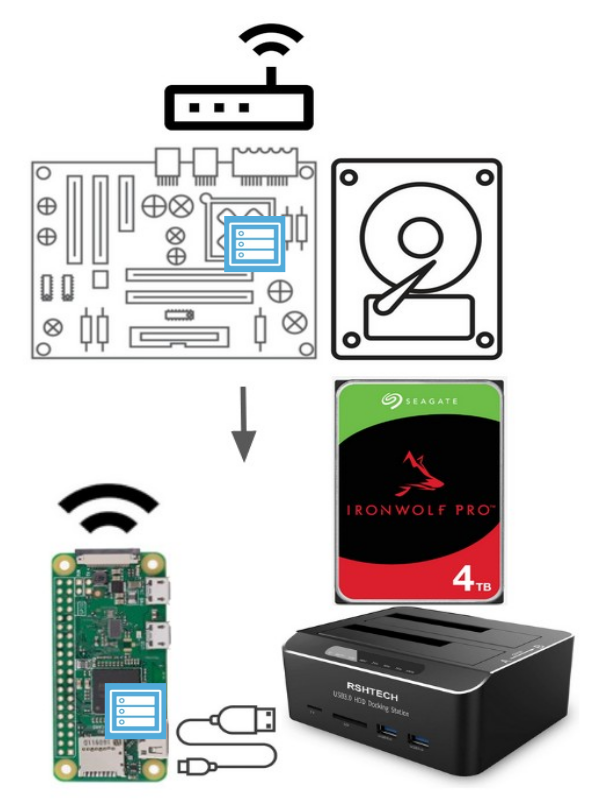
Figure 6: Subsystem B
Remote Storage (Open Media Vault Use Case)
What is a computer vision project without video and boxes drawn around identified objects? All video recordings of Buddy should be keep to ensure all of his stock trades are being faithfully executed.
Why not use local storage on the Raspberry Pi 4 from subsystem A? The microSD slot on the pi 4 would only allow for so much video play back and while one could connect a hard drive directly to the Pi from subsystem A that would make for a bulky setup and the HDD could easily be damaged by Buddy. Moreover, it would just be more fun to send the footage off to be saved in another room and this way it can easily accessed by any device on the network.